DMT System Engineer Accelerator
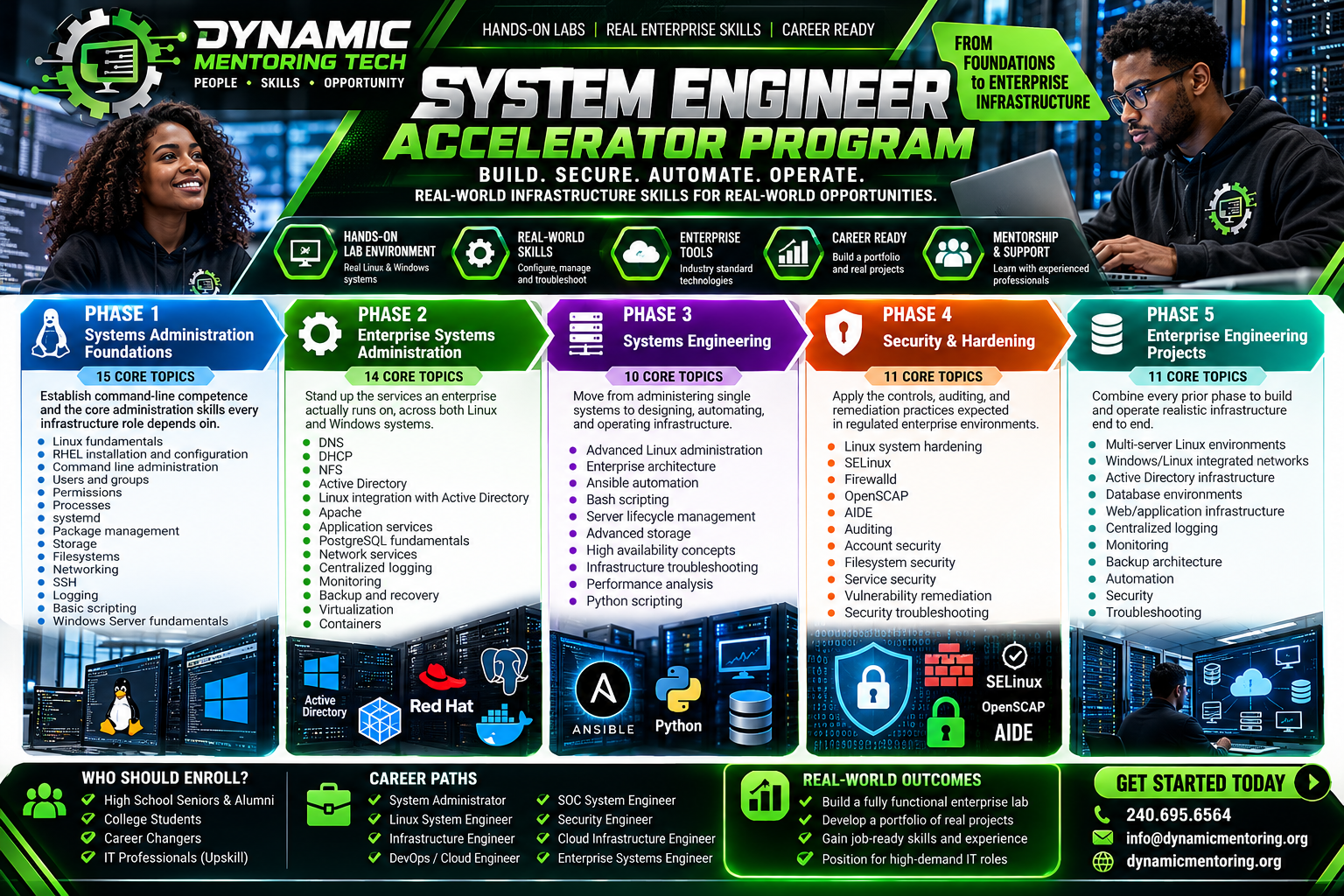
DMT System Engineer Accelerator Program
Student Project Deliverables
You’re Not Just Learning Systems Engineering. You’re Building an Enterprise!
At Dynamic Mentoring Tech (DMT), every student works toward building a fully functional, multi-server enterprise IT infrastructure environment.
Unlike traditional IT training programs that rely primarily on lectures and isolated exercises, our students progressively design, deploy, configure, integrate, automate, secure, and troubleshoot an interconnected enterprise environment.
Each phase produces tangible technical deliverables that become part of the student’s final Enterprise Infrastructure Engineering Capstone Project.
Phase 1 — Systems Administration Foundations
Project: Build and Configure Your First Enterprise Servers
Students establish the foundation of their enterprise environment using Red Hat Enterprise Linux (RHEL) and Windows Server.
Student Deliverables:
- Install and configure RHEL 9 servers.
- Install and configure Windows Server.
- Configure users, groups, permissions, and access controls.
- Configure network interfaces, IP addressing, hostnames, and SSH.
- Manage systemd services, processes, and software packages.
- Configure storage volumes and filesystems.
- Develop basic Bash administration scripts.
- Configure system logging and perform basic troubleshooting.
Project Outcome: A working Linux and Windows server environment with documented configurations and verified administrative access.
Phase 2 — Enterprise Systems Administration
Project: Build an Integrated Enterprise Network
Students transform their standalone servers into a connected enterprise infrastructure.
Student Deliverables:
- Deploy Windows Server Active Directory Domain Services.
- Configure enterprise DNS and DHCP.
- Integrate Linux servers with Active Directory using SSSD.
- Deploy NFS shared storage.
- Configure Apache web and application services.
- Install and configure PostgreSQL database services.
- Deploy containerized applications using Podman.
- Configure centralized logging and monitoring.
- Establish backup and recovery procedures.
- Configure virtual machines and network connectivity.
Project Outcome: A functional, integrated Windows/Linux enterprise network supporting centralized authentication, applications, databases, monitoring, and shared services.
Phase 3 — Systems Engineering
Project: Automate and Optimize Enterprise Infrastructure
Students transition from administering individual servers to engineering repeatable, reliable infrastructure solutions.
Student Deliverables:
- Develop Ansible playbooks for server configuration and application deployment.
- Create Bash and Python automation scripts.
- Implement standardized server configurations.
- Design enterprise infrastructure architecture diagrams.
- Configure advanced storage and server services.
- Perform infrastructure performance analysis.
- Troubleshoot complex Linux and network issues.
- Document server lifecycle and maintenance procedures.
- Demonstrate high-availability concepts and recovery scenarios.
Project Outcome: An automated enterprise environment with reusable configuration scripts, infrastructure documentation, and tested operational procedures.
Phase 4 — Security & Hardening
Project: Secure and Audit Your Enterprise Environment
Students apply enterprise security controls and demonstrate security engineering practices used in regulated environments.
Student Deliverables:
- Harden RHEL servers using documented security baselines.
- Configure SELinux enforcing policies.
- Implement Firewalld rules and network access restrictions.
- Perform OpenSCAP security assessments.
- Configure AIDE file integrity monitoring.
- Enable system auditing using auditd.
- Implement least-privilege access controls.
- Secure services, accounts, and filesystems.
- Identify and remediate system vulnerabilities.
- Produce security findings and remediation reports.
- Validate security configurations through follow-up assessments.
Project Outcome: A hardened and audited enterprise infrastructure with documented security controls, vulnerability remediation evidence, and compliance assessment reports.
Students practice security controls aligned with enterprise and government security expectations. Completing these labs does not itself establish regulatory compliance or an Authority to Operate (ATO).
Phase 5 — Enterprise Engineering Capstone
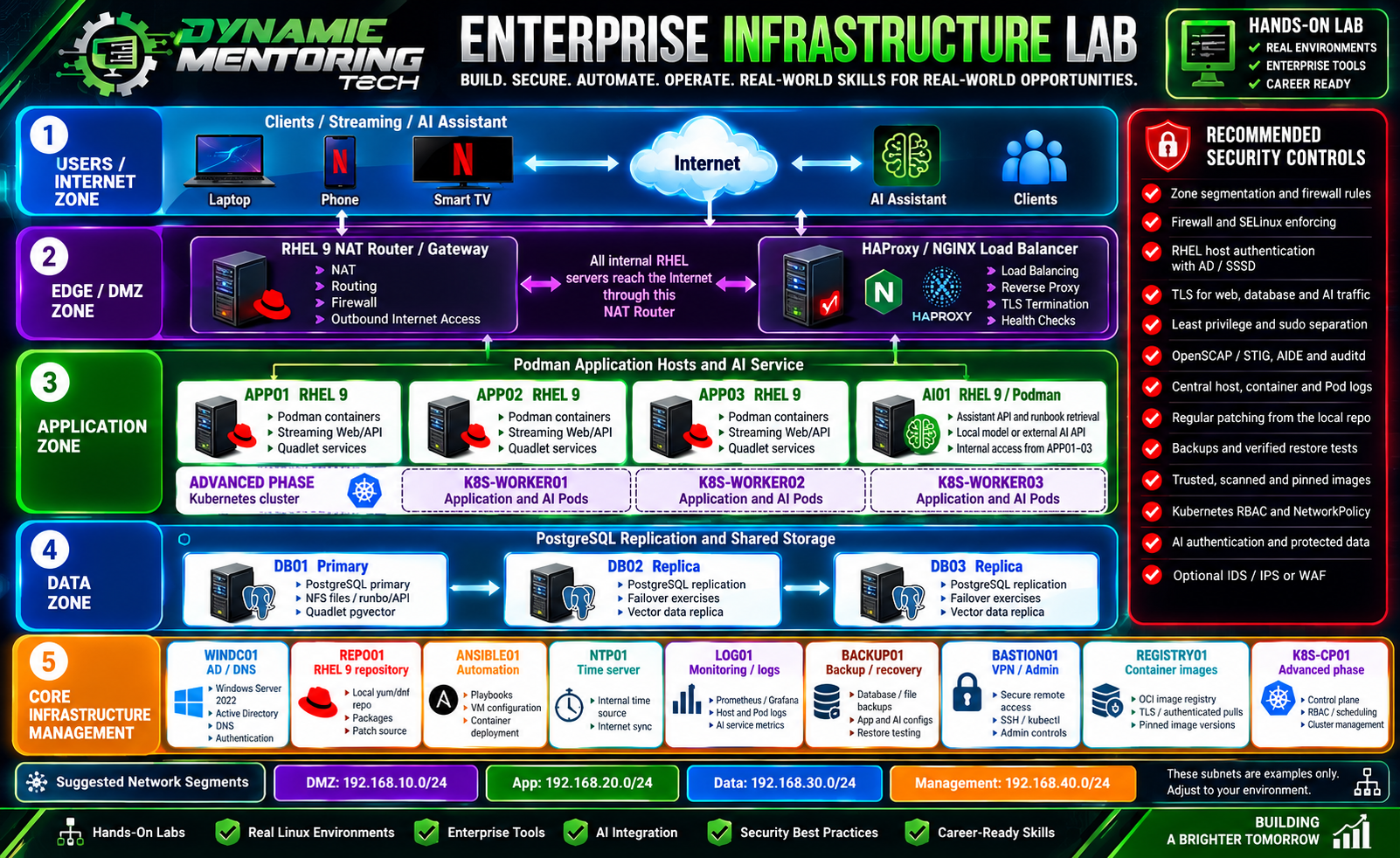
Project: Design, Deploy, Secure, and Operate a Complete Enterprise Infrastructure Lab
This is the signature project of the DMT System Engineer Accelerator Program.
Students integrate the technologies and skills developed throughout the previous four phases into one realistic enterprise engineering environment.
Final Enterprise Infrastructure Deliverables
1. Enterprise Network Architecture
- Documented network topology and server inventory.
- Segmented application, data, DMZ, and management networks.
- Configured routing, firewall rules, and secure remote administration.
2. Identity & Authentication Infrastructure
- Windows Active Directory domain.
- DNS and DHCP services.
- Linux integration with Active Directory.
- Role-based administrative access.
3. Enterprise Application Infrastructure
- RHEL application servers.
- Apache or NGINX web services.
- Podman containerized applications.
- Reverse proxy and load-balancing configuration.
4. Enterprise Database Infrastructure
- PostgreSQL primary database server.
- Database replication and recovery exercises.
- Shared storage and database backup procedures.
5. Automation & Configuration Management
- Ansible automation control node.
- Reusable infrastructure playbooks.
- Bash and Python administration scripts.
- Automated deployment and configuration workflows.
6. Enterprise Security Operations
- SELinux and Firewalld configurations.
- OpenSCAP security assessment results.
- Audit logs and file integrity monitoring.
- Vulnerability remediation reports.
7. Monitoring, Logging & Recovery
- Centralized logging infrastructure.
- Server and application monitoring dashboards.
- Backup and recovery architecture.
- Documented and tested restoration procedures.
8. Infrastructure Documentation & Demonstration
- Enterprise architecture diagram.
- Server inventory and configuration documentation.
- Automation repository.
- Security assessment and remediation reports.
- Troubleshooting and recovery runbooks.
- Final technical presentation and live demonstration.
Advanced Project Extensions
Students who progress into advanced engineering activities may extend their environment with Kubernetes, container registries, AI-assisted operations, advanced load balancing, and high-availability configurations.
These extensions provide additional exposure to cloud-native and emerging enterprise infrastructure technologies.
What Every Graduate Should Be Able to Demonstrate
At the conclusion of the program, successful students should be able to:
- Build: Deploy and integrate enterprise Linux and Windows infrastructure.
- Configure: Implement identity, networking, application, database, and storage services.
- Automate: Use Ansible, Bash, and Python to streamline infrastructure operations.
- Secure: Apply system hardening, auditing, access controls, and vulnerability remediation.
- Operate: Monitor, maintain, troubleshoot, back up, and recover enterprise systems.
- Present: Explain architectural decisions and demonstrate a working enterprise environment.
Your Final Deliverable: An Employer-Ready Engineering Portfolio
Every student who successfully completes the required projects will have a portfolio containing:
- Enterprise Infrastructure Architecture Diagram
- Documented Linux and Windows Server Environment
- Ansible, Bash, and Python Automation Projects
- Security Hardening and Assessment Reports
- Monitoring, Logging, and Recovery Evidence
- Infrastructure Troubleshooting Runbooks
- Final Capstone Demonstration and Technical Presentation
This portfolio gives students concrete examples of their technical capabilities to discuss during job interviews and career development opportunities.
The DMT Difference
We don’t just teach students how enterprise systems work. We teach them how to build, secure, automate, operate, and explain the systems themselves.
Dynamic Mentoring Tech — Building a Brighter Tomorrow!
Website: dynamicmentoring.org
Email: info@dynamicmentoring.org
Phone: 240-695-6564